Restaurant management softwareall in one app.

Kokoro AI brings HACCP, shifts and clock-ins, supplier orders, training and announcements for all your locations together. Your team does it from their phone; you see everything on one dashboard.

50+ locations · 2,000 checks a month · 0 health penalties

What it replaces

Five places your operation
lives today. One with Kokoro.

Every part of the day has its own improvised tool, and none of them talk to each other. This is the change, line by line.

  1. The HACCP binder and the temperature sheet on the cold room doorComplianceRecords with time and owner, and an alert when something drifts
  2. The rota spreadsheet and hours jotted in a notebookWorkforceRota, clock-in and staff cost in the same place
  3. Orders over WhatsApp and delivery notes in a boxSupplySupplier order and delivery note matched against it
  4. Courses in PDF and certificates in a folderAcademyTraining on the phone, with a deadline and a certificate
  5. The location’s WhatsApp groupCommunityAnnouncements with read receipts and the team chat
Why one app

What you gain when everything
lives in the same place

Five separate tools do five jobs. Together in Kokoro they also talk to each other: what happens in one changes what you see in the rest.

TodayYou know someone missed the night shift, but not that the closing checklist was never done.

The shift and its tasks, connected

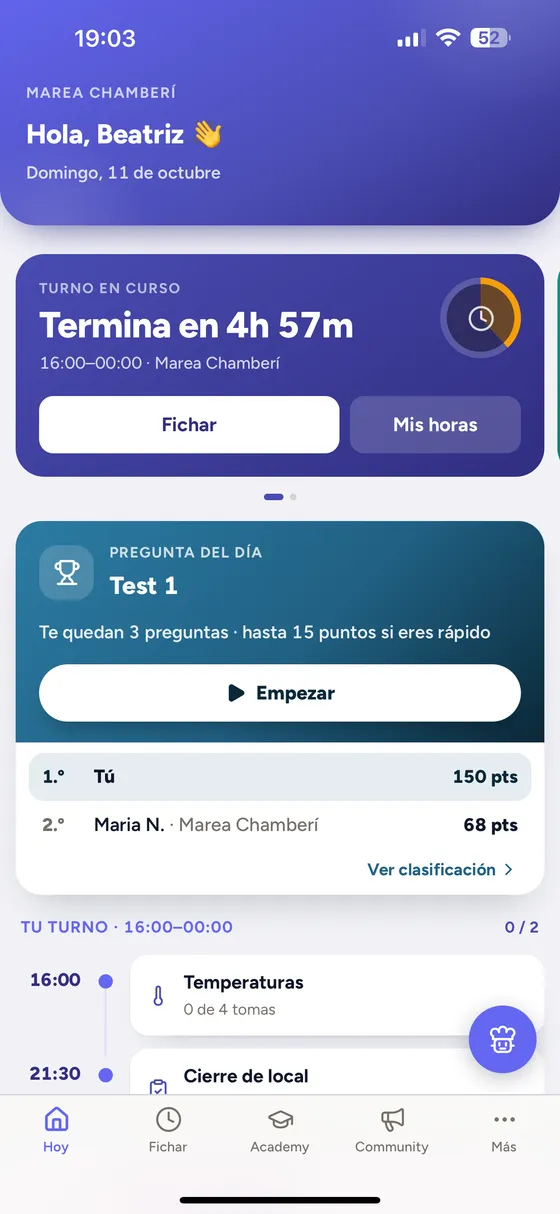
Each person sees the tasks of THEIR shift on their phone —temperatures, closing— and the manager sees on the same screen who is missing and what is left.

TodayEvery new hire goes into the spreadsheet, the WhatsApp group and the training platform. And when they leave, they stay in one of them.

One person, one profile

Added once, they are already in the rota, the clock-in, their training and their location’s chat. And their role decides, in one place, what they see in each module.

TodayOne app to clock in, another for courses and a group for announcements: the team ends up using none of them.

One app on the team’s phone

Kokoro Team brings their schedule, clock-in, training, announcements and the location chat together. One icon and one password, and they use it.

TodayTo know how a location is doing you have to call the manager or wait for a photo on WhatsApp.

Every location, on one screen

Today’s HACCP, covered shifts, orders and pending reads for each location, on the Ops dashboard. Without asking anyone to send it to you.

The five modules

Five modules.
The same locations and people.

Each module works on its own: switch on one, three or all five, and add the rest whenever you want, with no data migration. They all share the locations, the staff and the history.

ComplianceHACCP and operational control

HACCP done during the shift, not rebuilt on Friday.

Each check is logged when it happens, by whom and at what time. If a temperature drifts, an incident opens with its corrective action and the manager is notified.

See Compliance
  • Digital HACCP and temperatures
  • Opening, closing and shift checklists
  • Incidents that notify the manager
  • Internal audits
  • Recipes and allergens
  • Labelling
WorkforcePeople and schedules

The rota, the clock-in and what each hour costs, together.

The rota is published and reaches each person’s phone. Clock-in works by geofence, QR or PIN —offline too— and the cost comes from each location’s pay scale.

See Workforce
  • Weekly rota
  • Clock-in by geofence, QR or PIN
  • Absences and holidays
  • Staff cost per location
  • Working-time records
  • Team pulse surveys
SupplyPurchasing and stock

Buy with the price per kilo in front of you, not the box price.

Each product with its purchase formats and a comparable price. The order goes to the supplier by email and the delivery note, read by AI, is matched against what was ordered.

See Supply
  • Supplier orders
  • Delivery notes read by AI
  • Comparable unit price
  • Stock counts by zone
  • Stock levels
  • Recipe costing
AcademyTraining

Mandatory training done, with its certificate.

Courses built with AI from your own manual, which each person takes on their phone. Tests, surveys and exercises reviewed by a person, with deadlines and expiry dates.

See Academy
  • Courses built with AI
  • Tests, surveys and exercises
  • Learning paths by role
  • Certificates and expiry
  • Daily quiz with leaderboard
CommunityInternal communication

What changes, read and on record.

Announcements to the right people, with read receipts: you know 9 of 14 have read it and who is missing. And each location’s chat, with photos and voice notes, out of personal groups.

See Community
  • Announcements with read receipts
  • Location chat with photos and audio
  • Requests to head office
  • Document library
Two apps

One for those who run it,
one for those who work it.

Kokoro OpsManagers, area and head office

The operations dashboard: what is missing today at each location, the rota, orders, pending training and unread announcements. On a computer, the kitchen tablet or a phone.

  • All your locations on one dashboard
  • Alerts when something drifts
  • Reports by location and period
Kokoro TeamEvery person on the team

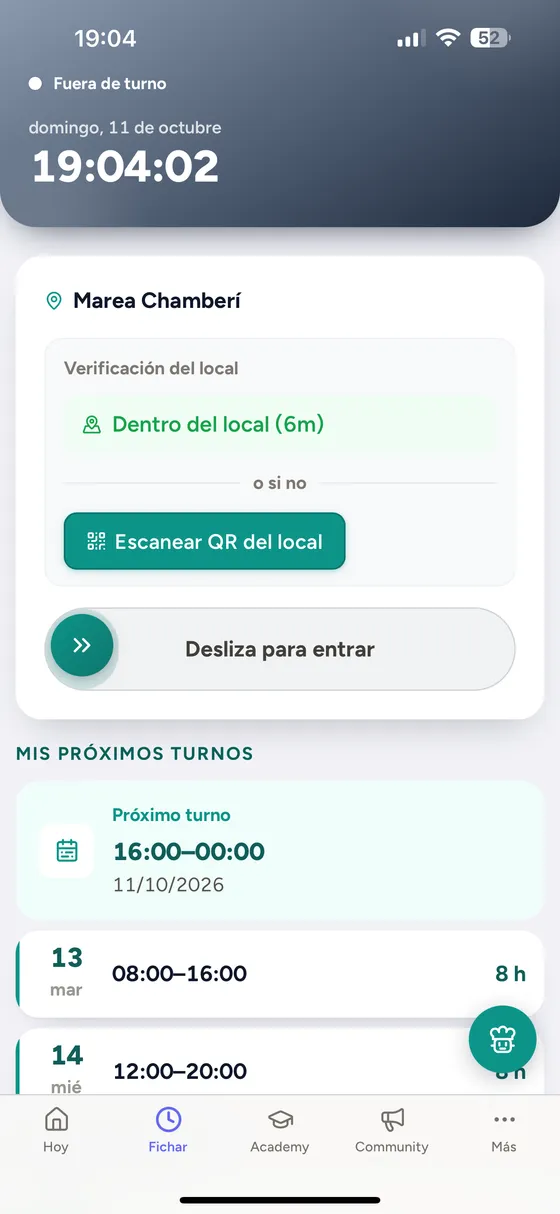
On each employee’s phone: their schedule, clock-in, training, announcements and the location chat. Installed from the browser, entered with the manager’s invitation.

  • Their weekly schedule
  • Clock in even without signal
  • Training and announcements
See Kokoro Team
Real screenshot of Kokoro Team: the clock-in screen at Marea Chamberí, inside the location, with the QR option and upcoming shifts.
Getting started

Days, not months

  1. 1We load your locations and staff

    Once, from what you already have: the list of locations, the people and, if you use them, your HACCP plan and shift checklists.

  2. 2You switch on the modules you need

    Start with the one that hurts most and add the rest whenever you want, on the same structure and without configuring anything twice.

  3. 3Your team joins from their phone

    With an email invitation or a four-digit PIN on the location’s tablet. Nobody has to look for an app in a store.

Who it is for

From the neighbourhood spot to the chain

Already working with Kokoro

  • Healthy Poke
  • Casal Sagrat Cor
  • La Tarteta
Locations managed
50+
Checks per month
2k+
Health penalties
0

Frequently asked questions about restaurant management software

What is restaurant management software?

It is the platform where the restaurant’s internal operation lives: food safety, staff and schedules, purchasing and stock, training and team communication. In Kokoro AI these are five modules sharing the same locations, people and history, so information stops being scattered across paper, spreadsheets and messages.

Is it for a single restaurant or only for chains?

It works the same for one location or a network of dozens. In an independent restaurant it replaces binders, notebooks and WhatsApp groups; in a chain it adds the view of every location, with the same processes in each and comparison across them.

Does it replace the POS or the booking system?

It does not have to. Kokoro AI covers the internal operation —HACCP, shifts and clock-ins, purchasing, training and announcements— that the POS and the booking system do not control, and it works alongside the ones you already use. If you also want the till in one place, we have our own iPad POS: Kokoro POS.

Do I have to take all five modules?

No. Each module works on its own: switch on one, three or all five and add the rest whenever you want, with no data migration. The level —Basic, Pro or Advanced— applies to every module you switch on.

How does the team get in?

With Kokoro Team, on their own phone: the manager sends an email invitation and they choose a password. If the location has a tablet, they can also sign in there with a four-digit PIN. Nobody has to find an app in a store.

Does it work offline in cold rooms and basements?

Yes. Records and clock-ins are saved on the phone even without signal and are sent automatically when the connection returns, with the real time they were made.

Does it cover working-time records?

Yes. Clock-in, breaks and clock-out are kept per person, with their real time, stored and exportable. And the check that someone clocked in from the location is done by the server, not the phone.

Are digital records valid in an inspection?

Regulation requires reliable evidence of self-control, not that it be on paper. A digital record with date, time, owner and traceability meets that requirement and is usually more robust than a sheet filled in by hand at the end of the shift.

How long does it take to go live?

Locations and staff are loaded once and serve every module. The goal is for the team to start within days; the real timeline depends on the number of locations and how many modules you switch on at once.

How much does it cost?

It depends on the modules you switch on, the level and the number of locations. The pricing page shows what each level includes; in a 20-minute demo we tell you what fits your operation before you decide anything.
See your own operation running in Kokoro AI

In the demo we go through your locations, your team and your real shifts, and show you how they would look in Kokoro. No commitment and nothing to install.

Keep going deeper

Last updated: October 11, 2026.